
The Ultimate UK Guide to Fitbit Models: Which Tracker Do You Own?
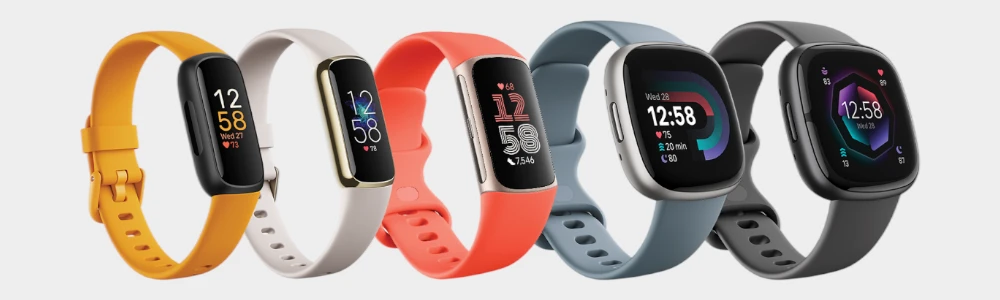
If you’ve ever tried to figure out whether you have a Fitbit Versa 3 or a Sense sitting on your wrist, or wondered why a strap designed for a Charge 5 won't latch onto a Charge 6, you are definitely not alone. Fitbit’s sleek, minimalist design language looks incredible, but it makes identifying individual models tricky because many generation upgrades look identical from the outside.
We unbox and handle these fitness trackers every single day on our workshop benches. Whether you are trying to figure out exactly which model you own, researching your next health companion, or trying to source parts that fit your specific casing, this straightforward enthusiast breakdown has got you covered.
How to Identify Your Fitbit: Finding Your Exact Model
Before ordering a replacement screen or upgrading your strap, it is vital to know exactly which Fitbit is sitting on your wrist. Because Fitbit likes to keep their designs incredibly sleek and minimalist, different generations (like the Charge 5 and Charge 6, or the Versa 3 and Sense) often look completely identical from the outside.
Here is how our workshop technicians identify any tracker that comes across our benches:
Method 1: Check the Back of the Tracker (Best for Charge & Luxe)
Flip your tracker over. Look closely at the metal casing directly underneath the heart rate sensor. Fitbit laser-engraves the model name (e.g., "Charge 6" or "Luxe") in very tiny, faint text right there. You might need to tilt it under a bright light or use a smartphone camera to zoom in and read it.
Method 2: Check Your Settings Menu (The Foolproof Way)
If the text on the back has worn off from daily wear and sweat, let the tracker tell you what it is:
Tap your screen to wake it up and swipe until you find the Settings app (the gear icon).
Tap Settings and scroll right down to the bottom.
Select About or About [Device Name] (depending on your software version).
Tap Regulatory Info or look directly on the screen. Your exact model name or regulatory model number (e.g., FB421 for Charge 5) will be displayed.
Method 3: Look Inside the Fitbit Mobile App
If your screen is completely black or unresponsive, you can check your connected phone:
Open the Fitbit app on your smartphone.
Tap your Profile icon (or Device icon) in the top-left corner.
Your connected tracker's exact name will be listed right at the top of the device list.
Where to Look on the Back Casing
Locate your Fitbit style below to find the model and regulatory details:
Anatomy of a Smartwatch: What Is Your Fitbit Made Up Of?
Have you ever wondered what is actually going on underneath your Fitbit’s sleek glass face? To the untrained eye, a Fitbit is a single, solid piece of tech. In our workshop, we see them as highly delicate, layered sandwiches of micro-electronics.
Understanding these physical layers makes it easy to understand what has failed when your device stops working, and whether you need a simple outer glass swap or a deeper hardware fix.
The Glass Lens & Digitiser Assembly (Touch Layer)
This is the most common part that breaks. The Lens is your protective outer glass (usually tough Corning Gorilla Glass). Bonded directly underneath this is the Digitiser, a paper thin, transparent mesh that reads your touch inputs. When you crack your screen but the screen still lights up and tracks, you have only shattered the lens layer.
The Display Panel (AMOLED vs. OLED)
The actual screen that produces the picture.
AMOLED: Featured on the Versa, Sense, Luxe, and newer Charge models. These are brilliant, high definition, full colour screens.
OLED / Greyscale: Used on older Charge models (like the Charge 3 and 4) to conserve power. They are basic, high contrast, black and white displays.
The Health Sensor Bezel (Sense Series Only)
Exclusive to the premium health trackers, this is a specialised metallic ring running around the glass perimeter. It acts as an electrode to read your skin's electrical changes (for stress and heart rhythm readings). If your screen is badly cracked across this area, these advanced sensors will stop responding entirely.
The Motherboard & Sensors
The engine room. This tiny circuit board holds your step tracking accelerometers, Bluetooth antenna, memory chips, and charging pathways. When we repair your screen, our absolute priority is ensuring this board remains completely sealed, dry, and untouched by dust.
The Lithium Polymer Battery
A tiny, high density rechargeable pouch. Because Fitbits are built to be incredibly lightweight, these batteries are incredibly compact. However, over several years of daily charging cycles or if moisture gets inside they can degrade. In some cases, a failing battery can physically swell, putting pressure on the display panel from the inside and causing the screen to pop loose from the frame.
The Fitbit Range Comparison Matrix
| Fitbit Model | Screen Tech | Strap Attachment Style | Shell Material | Hardware Vulnerabilities |
|---|---|---|---|---|
| Charge Series e.g., Charge 6 / 5 / 4 / 3 | Vibrant colour AMOLED touch screens (Charge 5/6) or greyscale OLED displays (Charge 3/4). | Model-Specific Slide Clips Charge 5 & 6 share clips; Charge 3 & 4 share a different clip format. | Anodised aluminium, glass, and resin composite casing footprints. | The integrated plastic band latches on the tracker housing can snap; screen glass is prone to direct face impacts. |
| Versa Series e.g., Versa 4 / 3 / 2 / Lite | Vibrant, square AMOLED touchscreens with curved edge glass. | Versa Interlocking Tabs Versa 3 & 4 utilize push-button clips. Versa 1, 2, and Lite use quick-release pins. | Lightweight, square anodised aluminium body housing. | Screen separation caused by failing original internal adhesives or expanded batteries. |
| Sense Series e.g., Sense 2 / Sense 1 | Premium AMOLED displays with integrated health sensor glass rings. | Sense Push-Button Latches Cross-compatible with Versa 3 and Versa 4 strap layouts. | Aerospace-grade aluminium with integrated stainless steel sensor bezels. | Cracked screen lenses from accidental drops disrupt advanced EDA/ECG tracking functionality. |
| Luxe Series e.g., Fitbit Luxe | Ultra-compact, slim-line colour AMOLED touchscreen panel. | Luxe Custom Quick-Release Dedicated slim-profile clipping tracks designed purely for Luxe bands. | High-polished premium Stainless Steel jewellery casing. | The tiny screen lens scratches easily due to its exposed design; susceptible to internal liquid entry if cracked. |
Scroll down for a more in-depth series breakdown.
How Can We Help You Today?
Shop DIY Parts
Browse our trade ready inventory of replacement, LCD displays, batteries and tools. All parts sales are backed by a clean 30-day returns policy.
Mail In Repair Service
Cracked your display screen or lost touch sensitivity? Skip the DIY risk. We offer professional screen swaps with a rapid 1–3 day mail-in turnaround and a 6-month warranty.
Shop Tools
Tackling the repair yourself at home? Explore our specialist selection of precision opening tools, magnetised Torx screwdrivers and industry grade adhesives engineered specifically for delicate smart electronics.
Fitbit Accessories
Looking to shield your watch or completely refresh its look? Check out our collection of smartwatch straps, protective cases, and optical grade tempered glass screen protectors.
Fitbit Charge Models: The Flagship Fitness Tracker
If your Fitbit is a slim, rectangular band that tracks your workouts without looking like a bulky smartwatch, you are likely wearing a model from the Fitbit Charge family. Spanning from the older greyscale Charge 3 and 4 up to the modern colour-screen Charge 5 and Charge 6, this is the UK’s most popular tracking line.
The Real-World Hardware: The Charge series packs incredible tracking tech into a tiny footprint. However, because it is worn tightly during heavy workouts, lifting weights, and manual work, it takes a massive beating. If your tracking display lines have bled, went completely black, or fractured across the glass interface, booking our professional mail-in repair service will safely restore your tracker’s casing.
The Accessory Configuration: The Charge family uses custom, model specific sliding clips that lock firmly into the tracker's body housing. It is critical to know your generation here. The older Charge 3 and Charge 4 share a wide clip size, meaning you can swap an old band for a fresh
Fitbit Charge 3 / 4 strapseamlessly. The newer generations completely changed this format, utilising a streamlined layout requiring a dedicatedFitbit Charge 5 strapor aFitbit Charge 6 strapto keep your tracker safely secured to your wrist.
Fitbit Versa Models: The Popular Smartwatch
If your tracker features a distinct, square shaped aluminium body housing with rounded corners, physical or inductive side buttons, and a large smartwatch display layout, you own a Fitbit Versa. This line includes the classic Versa Lite, the incredibly popular Versa 2, and the modern Versa 3 and Versa 4 models.
The Real World Hardware: Versa watches look stunning, but they have a well known structural quirk in our workshop: over time, failing factory internal adhesives or tiny expanded lithium batteries can cause the screen assembly to cleanly lift out or separate from the metal frame. Whether your screen has popped loose or completely cracked from a countertop tumble, our dedicated Fitbit Screen Replacement Service fixes the issue rapidly using trade grade sealants.
The Accessory Configuration: Fitbit completely overhauled the band mounting system halfway through the Versa life cycle. The legacy Versa 1, Versa 2, and Versa Lite models rely on traditional quick-release spring bars, which means you need a dedicated
Fitbit Versa 2 strapto fit those housings. The newer Versa 3 and Versa 4 lines swapped to an instant pushbutton interlocking tab system, requiring a modernFitbit Versa 4 straporFitbit Versa 3 strapto complete your wardrobe layout.
Fitbit Sense Models: The Advanced Health Specialist
If your watch looks almost identical to a Versa 3 or Versa 4, but features a distinctive metallic ring running along the glass bezel edge and tracks advanced health data like stress levels (EDA) or heart rhythms (ECG), you are wearing a Fitbit Sense or Sense 2.
The Real-World Hardware: The Sense is an incredibly advanced piece of health hardware, but its display glass plays a dual role as a sensor pathway. A deep crack or a spidered glass screen doesn’t just look messy, it can completely disable your watch’s ability to take electrical skin readings. Sourcing high quality components through our Fitbit screen replacement workshop path ensures all internal contact leads line up flawlessly.
The Accessory Configuration: Because the structural outer frame dimensions of the Sense family match the Versa smartwatch line, their accessory compatibility is perfectly mirrored. The Sense 1 and Sense 2 utilise the modern, tool free push button mechanism, allowing you to click on any universally fitting
Fitbit Sense straporFitbit Sense 2 straplayout in a matter of seconds.
Fitbit Luxe Models: The Slim Premium Jewellery Tracker
If your health monitor is exceptionally tiny, looks like an elegant piece of wrist jewellery, and features a polished, shiny stainless steel casing capsule paired with a bright, narrow colour screen, you own a Fitbit Luxe.
The Real World Hardware: Designed specifically as a high end fashion accessory, the Luxe trades rugged plastic armour for a luxury aesthetic. However, because the glass display panel curves proud of the stainless steel frame lines, it is highly vulnerable to accidental scuffs and impact damage. If your display has shattered, our
Fitbit Luxe screen replacementdirectory can help you restore its premium glass exterior.The Accessory Configuration: To maintain its delicate jewellery profile, the Luxe uses its own ultra slim quick release tracking connector. Traditional quick release pins or bulky plastic clips won't fit here; you must use a dedicated, slim profile
Fitbit Luxe strapto complement your outfit safely.
Fitbit Strap Overview
| Fitbit Models Compatibility | Attachment Type |
|---|---|
| Sense 2 / Sense / Versa 4 / Versa 3 | Push Button Interlocking Tab |
| Charge 6 / 5 | Slim Sliding Track Clip |
| Versa 2 / 1 | Quick Release Metal Spring Bars |
| Charge 4 / 3 | Wide Sliding Track Clip |
| Charge 2 | Quick Release |


Better for your wallet, better for the planet.
Get in touch for a quote & find out how much you can save compared to buying a new deivce